
You are using an out of date browser. It may not display this or other websites correctly.
You should upgrade or use an alternative browser.
You should upgrade or use an alternative browser.
New look?
- Thread starter septembre
- Start date

S
shirsweetipie
Guest
Ching Leng,
GREAT LOOK ! Keep up the gd work!!!

GREAT LOOK ! Keep up the gd work!!!
clueless2705
New Member
Hi CL,
This is a refreshing change...
but, where do i find the emoticons??
This is a refreshing change...
but, where do i find the emoticons??
M
mt
Guest
The "functions" seem to be repeated ie. there's the original left bar, the new top bar, the new bottom bar.
Problem with scrolling down the page, is that the top and bottom bars you have to move to the ends to reach the bars. So maybe the original left bar is a more convenient position?
In the threads themselves, because my screen is taken up by the original left bar, then the new column for poster's info, there's little width left for the messages.
Not meant as criticism but as feedback.
Problem with scrolling down the page, is that the top and bottom bars you have to move to the ends to reach the bars. So maybe the original left bar is a more convenient position?
In the threads themselves, because my screen is taken up by the original left bar, then the new column for poster's info, there's little width left for the messages.
Not meant as criticism but as feedback.
M
mt
Guest
Unless I right-click to open the threads in a new window.
I see why you've added the new top and bottom functions bars, previously, if people right-clicked to open the threads in new window- they don't have the functions bar?
I see why you've added the new top and bottom functions bars, previously, if people right-clicked to open the threads in new window- they don't have the functions bar?
H
hwey fang
Guest
Chin Leng
I woke up this morning and SB Forum greeted me with a new look! I was quite taken aback, wondering if you are doing some fine-tuning and I accidentally hacked in. Ha ha .....
Well done. A refreshing and yet professional look.
I woke up this morning and SB Forum greeted me with a new look! I was quite taken aback, wondering if you are doing some fine-tuning and I accidentally hacked in. Ha ha .....
Well done. A refreshing and yet professional look.
M
mt
Guest
Ignore my earlier comments- the page changed again, I suppose still in transition.
L
lin nov03
Guest
Chin Leng,
Finally, a better forum! A feedback though, please do something abt the right selection bars. It's taking up so much space on the screen and I have to constantly scroll right to left everytime I'm reading the posts. Anyway since this new look forum has updated functions I believe the ones at right are merely repeated and now redundant. To be honest I never liked to search through the hours options cos it's really not much use to me.
Anyway, good start. This should have happened sooner.
And by the way, this forum was just revamped today and I'm shut out from posting as 'someone's got the same or similar nickname already'. This is kinda upsetting cos I've been using this nick way b4 some others and many have come to known my nick. well, guess I can't complain too much huh?
Finally, a better forum! A feedback though, please do something abt the right selection bars. It's taking up so much space on the screen and I have to constantly scroll right to left everytime I'm reading the posts. Anyway since this new look forum has updated functions I believe the ones at right are merely repeated and now redundant. To be honest I never liked to search through the hours options cos it's really not much use to me.
Anyway, good start. This should have happened sooner.
And by the way, this forum was just revamped today and I'm shut out from posting as 'someone's got the same or similar nickname already'. This is kinda upsetting cos I've been using this nick way b4 some others and many have come to known my nick. well, guess I can't complain too much huh?
yippie, it's me again now with a new id instead of 'Lin nov03' after registering. Coming in again I immediately noticed such fabulous improvement! No more distracting column on the right!
Asking for perfection now,
, is it possible to sort threads by lastest posting rather than by alphabet? Took me a while to get back to this thread - cos I don't really remember thread names and I believe many don't too. Of cos I can use 'search' but isn't coming in and seeing the latest postings more convenient instead of being 'confronted' by a post made 3 years ago?
... anyway, fabulous job so far. Thanks!
Asking for perfection now,

Hi all,
Thanks for the compliments and feedback. We'll take note of the comments we received. We hope that everything you see now is the final presented version. However, small changes may be required when necessary while we tweak the board.
Apologies for not being able to answer some of your queries and e-mails. We were doing server upgrade (again!) and forum upgrade from 2.00 AM to 2.00 PM of 10 August.
A few changes worth mentioning here:
1. The forum has a easier way for including images in your posting. Now you'll just need to click on the button "Upload Attachement".
2. The forum also performs username check when a message is posted. If the username is already registered, it'll no longer be allowed to be used by other public users. This will help reduce identity confusion.
3. There is a "Private Message" (PM) function included in this upgrade. However, we've disabled it by default to prevent unsolicited PM. You can turn the PM function on by editing your account/profile.
Hope you enjoy this new upgrade!

Regards,
Chin Leng.
Thanks for the compliments and feedback. We'll take note of the comments we received. We hope that everything you see now is the final presented version. However, small changes may be required when necessary while we tweak the board.
Apologies for not being able to answer some of your queries and e-mails. We were doing server upgrade (again!) and forum upgrade from 2.00 AM to 2.00 PM of 10 August.
A few changes worth mentioning here:
1. The forum has a easier way for including images in your posting. Now you'll just need to click on the button "Upload Attachement".
2. The forum also performs username check when a message is posted. If the username is already registered, it'll no longer be allowed to be used by other public users. This will help reduce identity confusion.
3. There is a "Private Message" (PM) function included in this upgrade. However, we've disabled it by default to prevent unsolicited PM. You can turn the PM function on by editing your account/profile.
Hope you enjoy this new upgrade!
Regards,
Chin Leng.
clueless2705
New Member
Hi Chin Leng,
You mentioned about the PM function.. I went into my profile, and noted that the function "Do not accept PM" is not ticked... Does this mean that the PM function is being activated??
Another thing is how do i still attach those smiley faces (ie emoticons)??
You mentioned about the PM function.. I went into my profile, and noted that the function "Do not accept PM" is not ticked... Does this mean that the PM function is being activated??
Another thing is how do i still attach those smiley faces (ie emoticons)??
okeanosmao
New Member
hi chin leng,
i feel the fonts are too small. can change to other types of fonts?
i feel the fonts are too small. can change to other types of fonts?

Hi Chin Leng,
I registered before using the username 'Chocs'. Used to be able to post with 'Chocs' without any password, now the new setup needs to give a password or use a username different from the registered one.
Could you sent me my password as I can't seem to remember?
Thanks in advance
Chocs
I registered before using the username 'Chocs'. Used to be able to post with 'Chocs' without any password, now the new setup needs to give a password or use a username different from the registered one.
Could you sent me my password as I can't seem to remember?
Thanks in advance
Chocs
B
bb
Guest
hi CL,
these new features are cool!! nicely done!! gd work!
Maybe you have missed a button to bring us to go back to Singapore Brides home page.. thanks!
these new features are cool!! nicely done!! gd work!
Maybe you have missed a button to bring us to go back to Singapore Brides home page.. thanks!
B
bluesky22
Guest
Hi Chin Leng,
I have also forgotten my password, went to restore a new password and waiting for a access code to my email address as stated. But still did not receive any access code till now. Pls guide me how do I use my userid again
I have also forgotten my password, went to restore a new password and waiting for a access code to my email address as stated. But still did not receive any access code till now. Pls guide me how do I use my userid again
D
doomlaw
Guest
Chinleng,
I've been using my Nick Meow for at least a year. I didn't register it because at that time when i wanted, it was already used by someone. And now you said that because someone uses the same Nick, i can't use that nick anymore. But the usual topics i go know me with this nick. So what can i do now?
I've been using my Nick Meow for at least a year. I didn't register it because at that time when i wanted, it was already used by someone. And now you said that because someone uses the same Nick, i can't use that nick anymore. But the usual topics i go know me with this nick. So what can i do now?
Hi,
I guess 1 reason why you gals might have problems with the number of posting is maybe you might have posted a thread without using a password (just enter username only)....meaning just like a guest, thus it does not reflect the number of hints over in the forum even thou you registered as a member long time ago.
Is just my guess, correct me if I'm wrong
I guess 1 reason why you gals might have problems with the number of posting is maybe you might have posted a thread without using a password (just enter username only)....meaning just like a guest, thus it does not reflect the number of hints over in the forum even thou you registered as a member long time ago.
Is just my guess, correct me if I'm wrong
Hi Yan,
PM function had been deactivated by default for newly registered accounts. We've realised that for accounts registered before the forum upgrade, the PM function is activated by default. We would thus suggest for all forum members to log into their account to disable their PM fucntion if they wish to do so.
We apologised that we've not included the "emoticons" link in our navigation bar. We'll be adding it in soon. Temporarily, you may like to bookmark this link for the "emoticons".
http://singaporebrides.com/cgi-bin/forumboard/board-image-lister.cgi .
Regards,
Chin Leng.
PM function had been deactivated by default for newly registered accounts. We've realised that for accounts registered before the forum upgrade, the PM function is activated by default. We would thus suggest for all forum members to log into their account to disable their PM fucntion if they wish to do so.
We apologised that we've not included the "emoticons" link in our navigation bar. We'll be adding it in soon. Temporarily, you may like to bookmark this link for the "emoticons".
http://singaporebrides.com/cgi-bin/forumboard/board-image-lister.cgi .
Regards,
Chin Leng.
Hi Claris,
To clarify, you are scrolling horizontally not because of the size of your monitor but rather the screen resolution that you've set.
I'll suggest the following two solutions to help resolve the problem:
a. If you are still seeing the vertical navigation on the left-hand side of the screen, this will cause the forum not to have sufficient space to display properly. In our current version of the forum, we've not included the vertical navigation. You may like to press F5 of button of you keyboard to "refresh" the page.
b. Alternatively, you may like to set your monitor to a higher screen resolution of 800x600.
1.Go to your Desktop screen. Do a right-click on your mouse. You should see a new small window. Click on "Properties" or,
Click Start, click Control Panel, click Appearance and Themes, and then click Display.
2. You should see the window below:
<center>
 </center>
3. Click on the settings tab and drag the screen resolution slider to 800x600 or 1024x768 (if your video card is able to support).
<center>
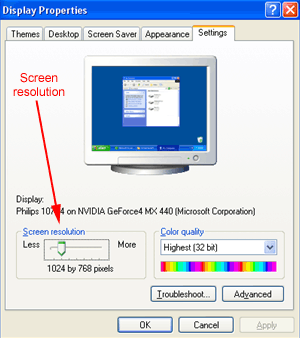 </center>
4. Click apply.
That should help.
Regards,
Chin Leng.
To clarify, you are scrolling horizontally not because of the size of your monitor but rather the screen resolution that you've set.
I'll suggest the following two solutions to help resolve the problem:
a. If you are still seeing the vertical navigation on the left-hand side of the screen, this will cause the forum not to have sufficient space to display properly. In our current version of the forum, we've not included the vertical navigation. You may like to press F5 of button of you keyboard to "refresh" the page.
b. Alternatively, you may like to set your monitor to a higher screen resolution of 800x600.
1.Go to your Desktop screen. Do a right-click on your mouse. You should see a new small window. Click on "Properties" or,
Click Start, click Control Panel, click Appearance and Themes, and then click Display.
2. You should see the window below:
<center>
3. Click on the settings tab and drag the screen resolution slider to 800x600 or 1024x768 (if your video card is able to support).
<center>
4. Click apply.
That should help.
Regards,
Chin Leng.
Hi Okeanosmao,
Only the font size of the "search" results page has been slightly reduced. The font size of the messages remains the same as before. You may like to check the settings of your font size on your browser.
You can do so by clicking on the "Veiw" option of your browser on the navigation bar. Then you'll see "Text Size". Select it and you'll see 5 settings "Smallest, Smaller, Medium, Larger , Largest". You may like to choose "Medium" or larger settings.
Regards,
Chin Leng.
Only the font size of the "search" results page has been slightly reduced. The font size of the messages remains the same as before. You may like to check the settings of your font size on your browser.
You can do so by clicking on the "Veiw" option of your browser on the navigation bar. Then you'll see "Text Size". Select it and you'll see 5 settings "Smallest, Smaller, Medium, Larger , Largest". You may like to choose "Medium" or larger settings.
Regards,
Chin Leng.
Similar threads
- Replies
- 1
- Views
- 348
- Replies
- 0
- Views
- 105
- Replies
- 0
- Views
- 124